Instagram is a powerful platform for marketing and communication. Sometimes you need to share a specific post with colleagues, clients, or friends. In this article, we will explain how to easily and quickly copy a link to a post on Instagram.
You may also need a link to a post in order to quickly access a specific post for analytics, comment management, or using third-party services.
Via the mobile app
Open the Instagram app Launch the app on your smartphone and log in to your account.
Find the desired post. This can be your post or a post from any other user.
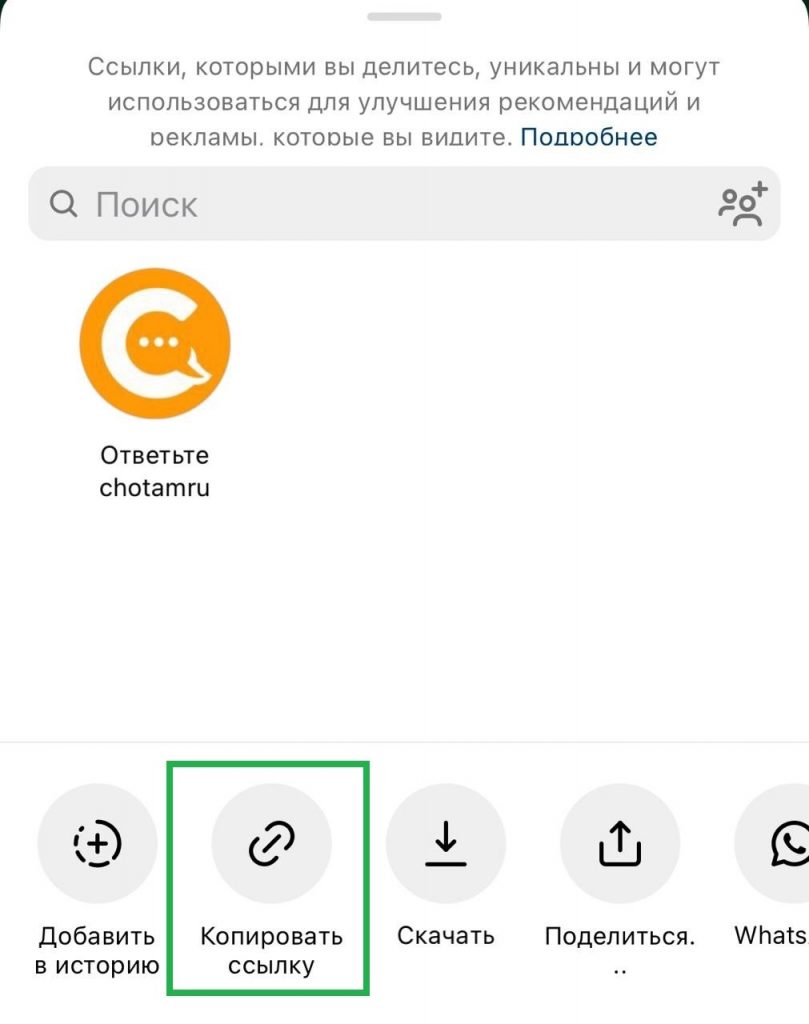
Tap the “paper plane”. In the lower left corner of the post, there is a “paper plane” icon. Tap it to open the options menu.
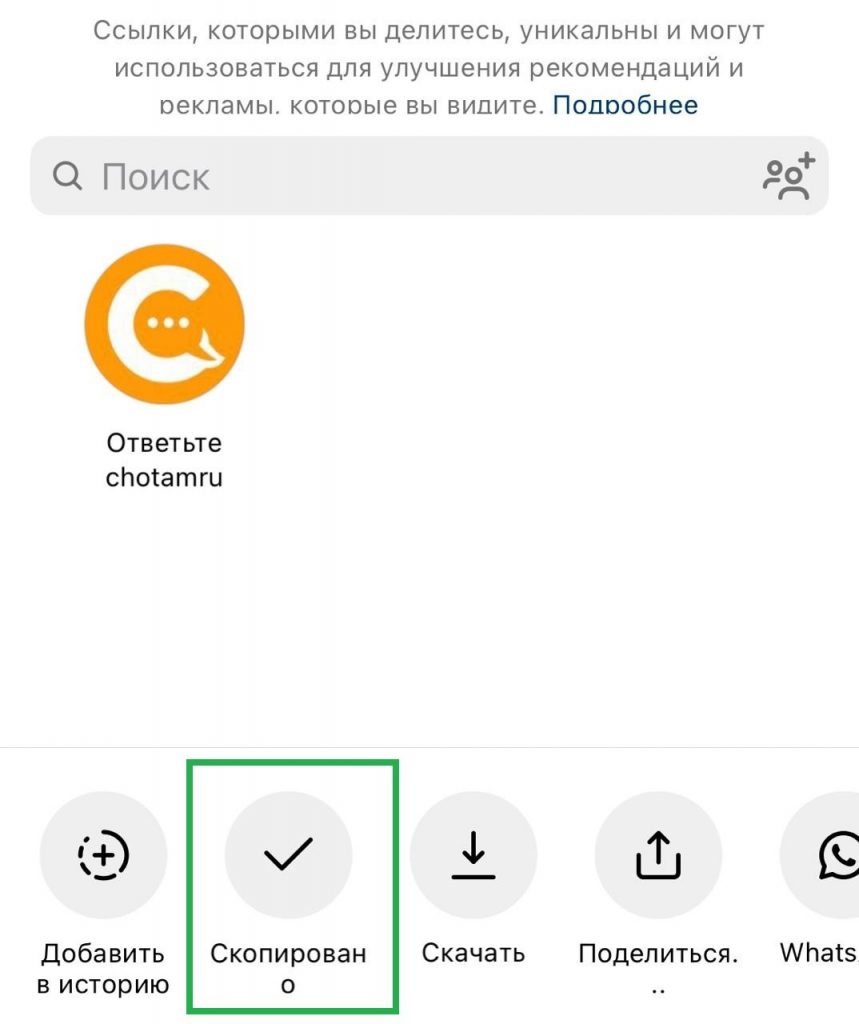
Select “Copy Link”. In the menu that appears, select the “Copy Link” option. After tapping the icon, the label will change to “Copied”. The link to the post will be copied to your device’s clipboard.
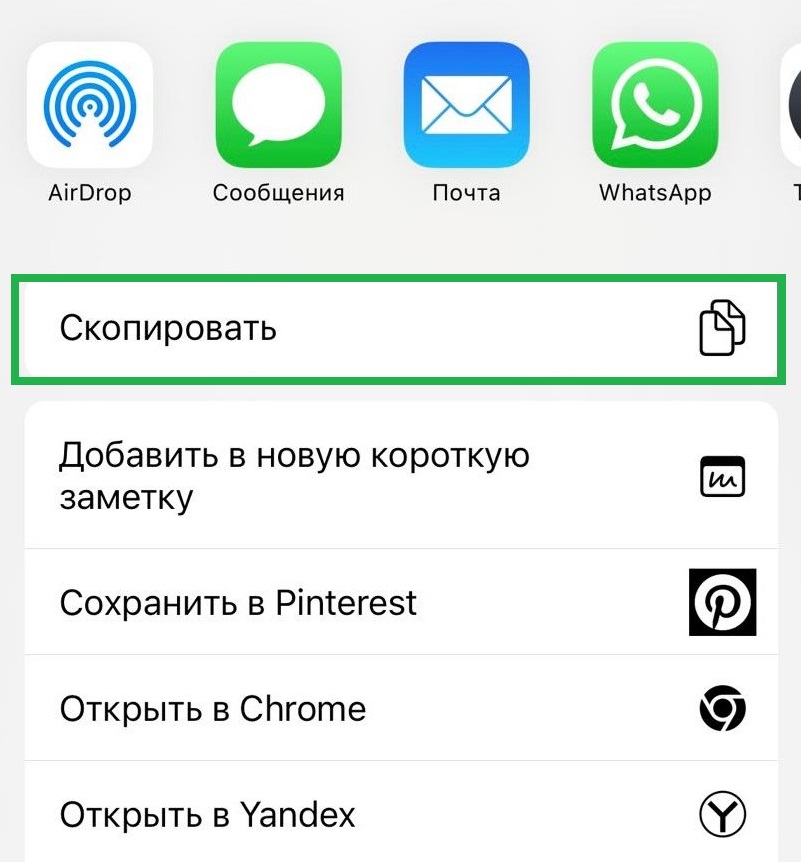
You can also copy the link via the “Share” option. After tapping it, you can copy the link, send it directly to the desired app, open it in a browser, etc.
How to copy a link to an Instagram post via the web version
Go to the Instagram website. Open your browser and go to instagram.com. Log in to your account.
Find the desired post. Go to the post you want to share.
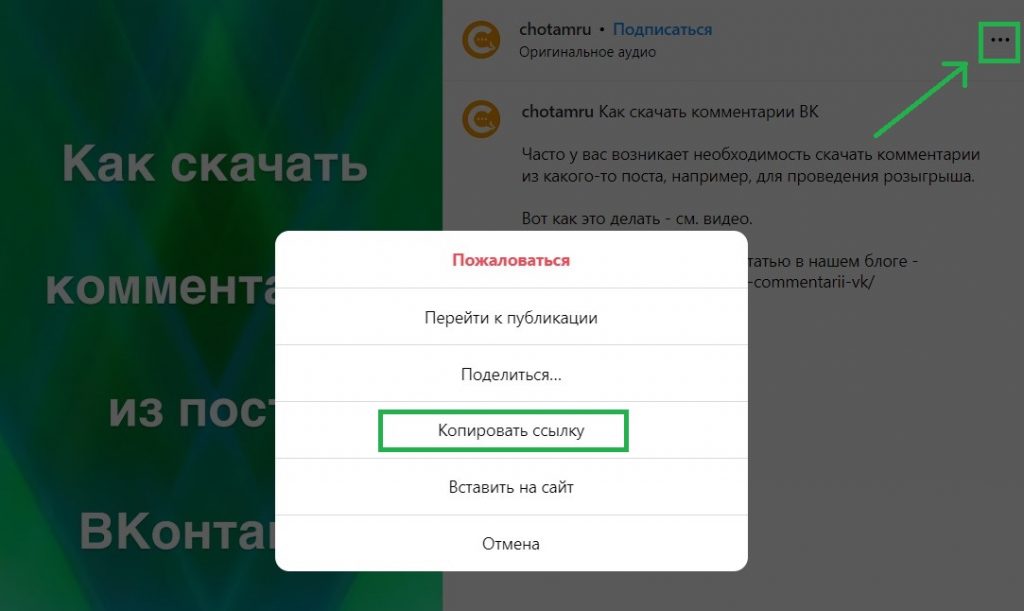
Click on the three dots. As in the mobile app, the three dots are in the upper right corner of the post. Click on them.
Select “Copy Link”. In the dropdown menu, select the “Copy Link” option. The link will be copied to your device’s clipboard.
Tips for marketers
For SMM specialists, it is important not only to publish posts, but also to understand how to work with them effectively:
Analyze engagement. Use links to bookmark, analyze audience engagement, and track campaign effectiveness.
Share with your target audience. Distribute post links via email, messengers, and other social networks for maximum reach.
Copying a link to a post on Instagram is a simple but important task that helps promote content and interact with your audience. Follow our steps to easily handle this task and use the links you get to improve your marketing strategies.
Instagram is the most popular business platform among social networks in the world. Instagram provides unique opportunities for interacting with your audience, attracting new clients, and strengthening your brand. One of the key elements in this process is user comments. In this article, we will look at how you can download Instagram comments and why this is important for your business.
Comments reflect opinions, emotions, and feedback that can make your Instagram profile more attractive to potential clients. However, it is not always convenient to analyze comments directly in the Instagram app. For more effective comment management and to use them in marketing strategies, businesses often need the ability to download them for further analysis.
Why is comment analysis so important for your business?
Running a giveaway in the comments. A common practice that increases your business profile statistics and user engagement.
Analysis of feedback and opinions. Comments can contain valuable information about your products or services. Downloading comments allows for a more detailed analysis of feedback, which helps improve products or services.
Increasing engagement. Replies to comments from your brand can improve audience engagement. Downloading comments allows you to track all user requests and respond to them promptly.
Content creation. Comments can be a source of inspiration for creating new content. Understanding the requests and interests of your audience helps create content that will be more attractive to your target audience.
Competitor monitoring. Comments on your competitors’ posts can also contain valuable information. Downloading comments allows you to analyze competitors’ activities and take steps to improve your own strategy.
How to download Instagram comments
Manual method. The most labor-intensive method, but also the most reliable. You can copy comments manually or use screenshots to save information. Suitable for beginner accounts with a small number of comments.
Instagram API. For more technically savvy users, there is an option to use the Instagram API to obtain comments. This method requires programming skills and access to the API.
Using third-party services and apps. There are apps and online services that allow you to download comments from Instagram posts. These apps usually provide the option to upload a link to a post, after which you can access the comments in a convenient format.
To get started, register at Chotam — we have a free trial period and a bunch of other useful features
Create a “Task” with a link to the Instagram post you are interested in
The download of comments will start automatically.
You need to wait a few minutes. If the comment counter stops increasing after a while, it means all comments have been downloaded.
If necessary, use filters (you can filter by date, author name, mentions, specific words, and more)
Download the selected comments to an Excel table — the button will be in the upper right corner.
Downloading Instagram comments is an important tool for businesses, helping to analyze audience feedback, improve engagement, and create a more effective marketing strategy. Regardless of the chosen method, regular comment analysis will allow you to stay up to date with your clients’ opinions and successfully develop your brand on social media.
When your number gets blocked on WhatsApp — the usual question is, of course, how to remove it. We will talk about this in our article below.
But first, we offer a slightly different perspective on this question — how to PROTECT YOURSELF from being blocked on WhatsApp, or at the very least — how to MITIGATE THE CONSEQUENCES.
Blocking a number on WhatsApp — what can cause it?
Let’s first figure out why your number on WhatsApp can be blocked.
There are only 2 main reasons for blocking:
You are doing something that your message recipients complain about — usually — sending spam (or some other unwanted information).
You have connected your number to a «grey bot» for sending out information.
The most important thing is to understand about user complaints. No one at WhatsApp will investigate whether it was really spam (sending advertising without the recipient’s permission), or if your recipient actually checked a box on some paper form at your clinic — «I agree to receive information from the clinic».
If a person receives a message and clicks «report» — and if about 5% of your recipients do this, you can be blocked.
There are quite a few cases where people managed to get blocked without doing any mailings at all, just by chatting with someone. The «triggers» that can lead to this are not fully understood.
The second scenario is when WhatsApp’s internal systems «see» that some person is sending an excessively large number of messages, and they are very much the same.
If you use a «grey bot» to do your mailings — you need to make sure that you have a sufficiently large interval between messages (a few minutes — should be enough for a regular person to type this text manually).
It is also necessary to insert so-called «randomization», that is, special blocks where words or phrases are replaced in each subsequent message with synonyms or similar expressions.
Attention: WE DO NOT use «grey bots», WE DO NOT endorse the practice of grey mailings (it obviously violates WhatsApp’s rules) — and we urge you NOT to use them.
How to protect yourself from blocking or prevent negative consequences
The path to try to overcome blocking will be described below, but for now — let’s talk about reducing the consequences.
Imagine, you have a webinar today, you need to send reminders, and then your number gets BLOCKED. What to do? The webinar is ruined, or at the very least — the attendance will take a serious hit!
Therefore, the most reasonable way to reduce this risk is DUPLICATION.
If you are a regular user — get yourself one or two or as many extra SIM cards as you can, from which you can send information.
If you are a WhatsApp Business API user — create another «business« in Facebook, and add 2-3 numbers to both businesses. Connecting them in Chotam costs NOTHING on the free plan, but in case of problems you will have a «plan B».
And as a maximum measure — create another FB account (under a different name), create a business in it, and connect numbers there. This may seem excessive, BUT there have been cases where, due to spam, ALL WhatsApp numbers connected to FB were blocked at once — not just the one that sent spam.
But here everything depends on the ratio of your effort/energy spent on this (it costs almost no money) and how much you would lose if your WhatsApp number is blocked.
All this will help protect you from being left WITHOUT a communication channel with your information recipients at a critical moment.
Blocking a number on WhatsApp — stages
When a number is blocked, there are 4 stages (for a regular user — only 2, and 2 — the first and last only for those who use WhatsApp Business API).
Template blocking — this template cannot be sent temporarily. Only for WhatsApp Business API — NOT for regular users.
Number blocking with the possibility of «appeal» — that is, you cannot send anything, you can only click the «request review» button — there you can write something about not sending spam, these are our clients, etc. (more on this below).
Permanent number blocking — occurs after your «appeal» is reviewed, if the moderators do not agree with your arguments. You can no longer use WhatsApp with this number, and there is nowhere else to appeal.
Blocking the entire business account in Facebook — all connected numbers are blocked and you cannot connect new ones. Only for WhatsApp Business API.
How to «appeal» or «request review»
If your number is blocked, but not permanently — there is a «request review» button (the name of the button may change as WhatsApp’s interface and localization change, but the essence is the same).
For regular WhatsApp users, this button will be in the app on your phone.
For WhatsApp Business API users — in the business dashboard in Facebook — in WhatsApp Manager.
When you click it, you are prompted to enter some text.
You need to write something there that describes your situation and says that this is not spam.
Example: «please take a look, we are a clinic, we send information to those who have visited us. This is not spam — all these people signed a consent form for information, and there were very few of them. This is not a mass mailing, and not spam.»
You can try writing the same thing in English. There is an unverified rumor that this improves your chances of being unblocked.
In general, with a fairly high probability, after the first preliminary block you will be unblocked. Apparently, something like «give a second chance» works.
Usually after the second or third block — it will not be possible to recover.
WhatsApp Business API (WABA) is a tool for businesses that allows interaction with customers via WhatsApp. Connecting WABA will enable a company to send newsletters, order notifications, offers, and much more directly to users’ messengers.
Connecting WABA is an important step for a business that will help improve communication with customers and increase the effectiveness of marketing campaigns.
Types of WhatsApp Mailings
There are basically two types of mailings in WhatsApp:
Unofficial mailings. This includes all possible ways to bypass WABA: creating groups, regular “manual” messages, all sorts of “gray” mailers. The only advantage of unofficial mailings is the cost.
Official mailings via WhatsApp Business API
WhatsApp has strict rules regarding message mailings. Unofficial mailings are blocked by the service quite quickly, as WhatsApp strives to maintain a high level of security and user data protection. Therefore, we strongly recommend connecting the WhatsApp Business API (WABA) to avoid blocks and maintain your brand’s reputation.
Professionalism and reliability: WABA gives companies official status in WhatsApp, which increases customer trust.
Scalability: The ability to handle large volumes of messages, making WABA an excellent tool for large companies.
Personalization and interactivity: WABA allows you to create personalized messages and provide customers with interactive features — in particular, buttons to react to messages, with which you can implement many possibilities.
Cons
Limited Access: Access to WABA is not as simple as creating a regular WhatsApp account. It is provided only to businesses that have gone through the approval process from WhatsApp.
Complexity in Setup: Connecting WABA can be a complex process, requiring technical skills and certain knowledge.
Cost: Payment for connection services and use of the tool. More details in our article — Whatsapp Business API — price
How to connect WABA
Get access to WhatsApp Business API. You will need a Facebook Business account to which you will connect the phone number. You need to submit a request to connect to the WhatsApp Business API, which is usually done from the WABA provider’s dashboard — such as Gupshup, for example. This step includes the verification and approval process from WhatsApp.
Profile setup. After access is granted, you will need to set up your profile — add company information and other data.
Select a mailing builder. After connecting WABA, you need to connect a mailing builder, which will simplify the creation and management of mailings. In principle — this is the most important stage. Everything above can be implemented with any builder, but it is this point that will determine what the mailer can or cannot do, how convenient it is to work with, and what statistics are available. We recommend the mailing platform Chotam— an intuitive service with fast support ready to help with WABA connection.
Business verification. To send more than 250 messages per day, you will need to verify your business on Facebook.
Creating templates and testing. Use message personalization features to attract customer attention. Quick automated replies in the form of buttons. Test before sending to make sure everything works correctly.
Monitoring and analytics. After launching mailings, it is important to track and analyze their effectiveness. Monitoring will allow you to make adjustments to your strategy and improve results.
So, connecting to the WhatsApp Business API can be an excellent tool for improving communication with customers and increasing the effectiveness of marketing efforts. However, it is necessary to pay attention to the rules and policies for using mailings, ensure the protection of customer data, and follow recommendations for using this tool to achieve the desired results in business.
When connecting the WhatsApp Business API, its price is one of the most complicated questions. We explain everything in detail.
We apologize in advance for such a long and tedious article) — but we didn’t come up with this pricing)
WhatsApp Business API Connection Scheme
Unlike fairly simple connection methods, the WhatsApp Business API is a complex topic.
For example, with a Telegram bot — you just create a bot, and essentially the bot token «is the bot», and having the token — you can already do «whatever you want», or in VK — you simply automate group replies — and that’s the bot.
WhatsApp has a two-step connection system (the official way):
Approved providers <- All other chatbot services
There are «approved WhatsApp providers» — there aren’t many of them in the world, just a few dozen. These are huge companies that essentially act as a «pipeline» to WhatsApp.
All other services, like ours, which provide systems for creating chatbots/broadcasts in WhatsApp, connect to them.
We work with two such providers — Gupshup.io and 360dialog. Why do we need two? Simply for reliability/redundancy, because in the current environment you never know who might disconnect what and when.
How WhatsApp Business API is Connected
First, you connect a number (usually a new SIM card) to WhatsApp — in the approved provider’s dashboard. This is simply so that «messages can be sent».
Once that’s ready, you connect your number to a bot builder/broadcast tool — like ours, and such systems provide all the bot logic, broadcast management, and so on.
WhatsApp Business API — Price
Because the connection in WhatsApp is two-step, the price also consists of two parts.
You pay WhatsApp for conversations (through an «approved provider») — this is the official price set by WhatsApp, which they charge for each conversation (you may need a VPN to open this link). This is about 8 rubles per conversation. There may also be an additional monthly fee. Since these are Western services, payment must be made with a foreign (non-Russian) bank card, or — in some cases, through an intermediary service (we have one for Gupshup — for legal entities).
You pay for the bot/broadcast service system — for a service like ours. And here the price depends purely on the market and how services value themselves — from several hundred to thousands of rubles per month. In our service — only 490 rubles per 1 WhatsApp number.
Some systems combine these two prices internally, and you may not even know what’s happening inside and how much things cost, but we adhere to the principles of transparency and tell it like it is.
Price per Conversation
Let’s take a closer look at what «price per conversation» means.
WhatsApp has a «24-hour rule». That is, the bot can only send arbitrary messages to a user within 24 hours of their last message to the bot.
After this window closes — or if a particular person has never messaged the bot before, the bot can only send a pre-approved message template to the person. And this — costs money)
More precisely — when you send such a message (paid), you «open a window» of communication with the user for 24 hours. If the user replies — you can continue messaging with them.
This is IMPORTANT: After «opening the window», within 24 hours you can SEND OTHER TEMPLATES of the same category FOR FREE (the next chapter will be about categories).
Price by Category and Category Features
Messages are charged in 4 categories:
Marketing — essentially any promotional broadcasts like «we have a sale — come visit».
Utility — broadcasts related to service — order confirmation, delivery status, payment reminders, feedback requests.
Authentication — narrowly specific things for login confirmation (you most likely won’t need this).
Service — a client’s request to you (incoming). Yes! WhatsApp charges for incoming messages too, but gives 1000 free INCOMING conversations per month.
Broadly speaking — everything related to your communication with EXISTING clients about their current or recently placed orders — is «Utility». Sometimes reminders about webinars can be classified as «utility» — even though they are not explicitly «orders».
Why are we talking about this in such detail — because the price for sending a «utility» template (from 4 rubles) is almost twice as low as «marketing» (from 8 rubles)
There is also another feature — different types of conversations! For example, a user receives a «utility» broadcast from you — for example, an order reminder. But! If you also send them a promotional «marketing» broadcast, even within 24 hours, this is also charged — because these are DIFFERENT types of conversations.
This concludes our overview of this complex topic.
If you still have any questions — write to us in the support chat (chat icon at the bottom left) or call +7 913 463 51 58 — we will be happy to consult you, it’s free.
It is often thought that blocking WhatsApp is impossible on “white” bots, and only happens on “grey” ones, but this is not true. Let’s go over all the details.
How white and grey bots differ
White bot uses the official WhatsApp mailing mechanism — the so-called WhatsApp Business API or WABA for short. This is a legal way, provided by WhatsApp itself, to send mailings and connect a bot.
Grey bot connects to another computer or phone (as if you were connecting another device yourself) and uses automation tools to send messages from it.
It is important to understand that grey bots operate illegally and violate WhatsApp rules. We absolutely DO NOT support the use of grey bots, and do not use them in our work. This material is provided for informational purposes only.
Key differences:
White bot connects via Facebook business manager — the procedure is quite complicated (if you’ve never done it before), while the grey bot connects via QR code as another device (this is simple).
White bots can have buttons, but grey bots cannot — so they usually use “reply 1 for this, and reply 2 for that”.
With a white bot, you can only send pre-approved templates first (this takes up to 24 hours and may be rejected). With a grey bot, you can send anything you want (anything WhatsApp allows).
When using a white bot, you have to pay for outgoing messages (8-9 rubles per message). For many users, this is expensive. With a grey bot, you only pay for the connected service — usually about 1000-2000 rubles per month.
With a white bot, you can have a limit of up to 10,000 messages per day (for large companies). With a grey bot, you are unlikely to send more than 100-150 messages per day — otherwise you will be blocked.
Overall, blocking is much more likely with a grey bot, but a white bot is not guaranteed against it either.
Violation of WhatsApp rules — and here not only the bot can be blocked, but also an ordinary person.
Frequent user clicks on “this is spam”.
WhatsApp suspects you have connected a grey bot.
There is often an opinion that a white bot is a guarantee against blocking. NO, this is not true! Even a white bot or even a regular user can be blocked if you simply send spam to people.
Nevertheless, a white bot is indeed blocked much less often.
A grey bot is most often blocked because too many messages are sent too quickly — for the system, this is a clear sign that it’s a bot.
Another reason for blocking a grey bot is identical messages in large quantities. For this, grey bots use a message randomization mechanism — that is, replacing individual words or phrases with synonyms or similar ones.
Both of these reasons DO NOT APPLY to the white bot, because it is made for this purpose and uses it legally!
A white bot can only be blocked if, during a mailing, too high a percentage of people (somewhere over 5%) clicked “this is spam”.
WhatsApp blocking — consequences
With a grey bot — you simply can no longer use WhatsApp — so a separate number is always used for the bot. These are often lost. At the same time, you still have the option to file an appeal — explain the situation, and in some cases, your WhatsApp is restored.
With a white bot — blocking is two-stage. First, you will be prohibited from sending a specific template — the one people complain about. And if the complaint rate does not decrease, you will also be prohibited from sending mailings. And you also have a mechanism to file an appeal — explain something, etc. — as a rule, this works, unless you were sending blatant spam.
WhatsApp blocking — what to do?
If you are blocked — both with a white and grey bot, you still have the opportunity to appeal. Just write some explanation in the window, what you were doing, why it’s not spam, and that you should be unblocked.
With a grey bot — this is done directly in the app on your phone.
With a white bot — this is done in a special window inside the FB business manager.
Chat bot on Facebook — a convenient way to communicate with your clients, which saves time and speeds up the sales process.
Facebook is one of the largest social media platforms in the world. It provides unique opportunities for creating and using chat bots in various fields.
In the modern world, social networks have become an integral part of our daily lives. Thus, chat bots on Facebook are at the forefront of providing convenient and effective communication.
What is a chat bot on Facebook
A chat bot is a program designed to automate communication with users through a chat interface.
A distinctive feature is that here the bot responds on behalf of the Facebook page. It is not a separate “entity” as, for example, in Telegram, where there can be a channel or group separately, and the bot separately.
In the context of Facebook, chat bots are usually integrated into the platform’s messenger, allowing users to interact with the bot as if it were a real interlocutor.
Chat bots on Facebook can be used for various purposes. They provide more direct and instant interaction with users, which can be useful for business and improving user experience.
Applications of chat bots on Facebook
Customer service. Chat bots help companies improve customer service by providing quick and accurate answers to frequently asked questions.
Online sales. Bots are also actively used for conducting online sales, providing users with convenient tools to explore products and make purchases.
Information search. Bots help users find up-to-date news and information based on their requests.
Study assistance. Chat bots can be used for educational purposes, providing students with additional materials, answers to questions, and feedback.
Advantages of chat bots on Facebook
24/7 availability: Chat bots are available around the clock, ensuring instant interaction with users at any time of day.
Service efficiency: Automated responses and request processing reduce waiting times and increase the efficiency of customer service.
Personalization: you can insert the person’s name or other variables into the message, providing a personalized experience.
Business expansion: Implementing chat bots into business processes can help companies expand their audience reach and improve conversion.
Platforms for creating chat bots
There are many platforms and tools that make it easier to create chat bots on Facebook.
When choosing platforms, we recommend paying attention to the convenience of the interface and the availability of quality and fast support. It will be more convenient for you if one builder supports all the messengers and social networks you need.
Almost all such platforms and services have a free trial period — you can try several and choose the best option for you. With our service chotam.ru you can create and set up chat bots with various functional capabilities.
With chotam.ru, you can create a chat bot that will automatically communicate with your subscribers, provide information about products and services, and also collect contact data for further communication.
Try the chotam.ru service on a free trial period and see the convenience for yourself!
Legality of bots
When using chat bots on Facebook, it is necessary to consider legal issues. Different countries have laws and regulations governing the processing of personal data, privacy protection, and e-commerce. Chat bot developers must comply with these regulations to avoid legal problems.
It is also worth noting that Facebook has its own detailed rules and policies, which we recommend studying.
In particular:
The bot cannot message a person first — the person must write to the bot first.
The bot cannot message a person after 24 hours from their last interaction. Therefore, BROADCASTS in the usual sense are practically not applicable on Facebook. For this, you need to use WhatsApp.
Chat bots on Facebook are becoming an integral part of our digital society, providing convenient and effective means for communication, customer service, and business development. With their help, you will open new horizons for your business.
WhatsApp text formatting allows you to add emphasis to your message. There are several simple ways to format text in WhatsApp:
Bold text:
To make text bold, place it between two asterisks (*).
Example: *This is bold text* will appear as This is bold text.
Italic text:
To make text italic, place it between two underscores (_).
Example: _This is italic text_ will appear as This is italic text.
Strikethrough text:
To strikethrough text, place it between two tildes (~).
Example: ~This is strikethrough text~ will appear as This is strikethrough text.
Monospaced text:
To create monospaced text, place it between triple backticks (`).
Example: This is monospaced text will appear as This is monospaced text.
Combining formats:
You can also combine different formats by placing the text between the corresponding symbols.
Example: *_~This is a combined format~_* will appear as This is a combined format.
These simple formatting methods will help make your message in WhatsApp more expressive and vivid.
Emojis
Also, don’t forget that you can use emojis in WhatsApp messages.
Emojis help to show an emotion, highlight an important point, or point with an arrow or “finger” to a link that needs to be clicked.
How to use WhatsApp formatting
It is important to use a reasonable amount of highlighted text through WhatsApp formatting, and not to make a real mess of text with different formatting.
If the user, as they say, gets “bleeding eyes” from your message, then of course the useful reactions to such a message will be much less.
Use text highlighting to mark the most important words or phrases — for example, with your latest offer, promotion, or update. Highlighting is also often used to indicate an address — of a store or, for example, a website.
Buttons in WhatsApp
In addition, you may have received WhatsApp mailings that had convenient buttons for reactions.
Many users would like to use buttons in their messages because they look attractive and help engage the user.
Unfortunately, only a bot can officially send buttons in WhatsApp, not a regular user.
Moreover, even if a user managed to send a button with some lifehack, they would not be able to program what happens next after pressing this button.
All such behavior is implemented through bots in WhatsApp; here, bots are very well developed and probably work even more efficiently than in Telegram.
Why do we need chatbots, which have become an integral part of the modern world? Why are they so important? Let’s dive into this exciting journey where machines and humans go hand in hand.
A tireless assistant around the clock
Imagine having an employee who never gets sick, never gets tired, and is ready to answer your questions 24/7. You don’t have to wait for a lunch break or working hours. Chatbots are exactly that—your personal assistant. For example, VTB Bank uses a chatbot to quickly assist clients, even when their employees are asleep.
Cost reduction
Traditional support services require significant investment: salaries, training, technical support. But a chatbot is created once and only occasionally needs updating. This saves money, and many companies value this. For example, Uber uses bots to handle standard requests for their services.
Fun fact — according to Chotam.ru — up to 10% of support operators’ working time (depending on activity) can be spent just typing greetings.
Modern chatbots can analyze user preferences and offer solutions based on individual needs. Think of a bot that knows you like coffee with milk and offers exactly that order at your favorite coffee shop.
Instant feedback
Live communication with a person can take time. A chatbot, however, responds instantly, which is especially important in an era of speed and continuous information flow.
It is especially important that communication automation is implemented not only in messages but also in comments. A chatbot built on a good platform, such as Chotam.ru, can not only create regular autofunnels, but also respond to comments, remove unwanted mentions, such as profanity or abuse from comments.
Practical examples
Tech company support service: The well-known IT company Slack uses a bot to train its users. This bot helps to understand the main functions and quickly get started.
Online shopping: Many companies, such as H&M, use chatbots to help choose clothes, providing recommendations based on your previous purchases or current trends.
In the end, you shouldn’t be asking whether chatbots are needed, or why we need chatbots. It’s not just a trendy novelty. They are the future of communication and business. They speed up processes, make them more economical and convenient for users. In a world where time is the most valuable resource, chatbots are a real gift!
In popular communities, it is often necessary to track the sentiment of comments in order to monitor the community’s progress, or even people’s attitudes towards individual posts.
Social networks provide a unique platform for interacting with clients and potential consumers. However, simply “being on social networks” is not enough. To use social platforms effectively, businesses need to understand how users react to their content, products, or services. One way to achieve this is by tracking the sentiment of comments.
Why is this necessary?
Understanding the Audience
Sentiment analysis helps you understand the mood of your audience. This can be useful for identifying problems or opportunities that require your business’s attention.
Reactive Marketing
Quickly identifying negative feedback allows your company to respond promptly, minimizing potential reputational damage.
Strategic Planning
Long-term sentiment analysis of comments can help in making strategic decisions, such as making changes to a product or adjusting a marketing campaign.
What tools are there to track comment sentiment?
Artificial Intelligence
Today, there are many AI-based tools that automatically analyze text sentiment. Examples of such tools: Google Natural Language, IBM Watson Tone Analyzer, and others.
Software Solutions
There are also many SaaS solutions specifically designed for social monitoring, such as Hootsuite, Mention, or Brandwatch.
However, a significant drawback is their price. Hootsuite, for example, costs from $100 per month. For large businesses, this may be acceptable, but for small businesses or running public pages, it is debatable whether this tool brings that much benefit.
In addition, many Western systems poorly process the Russian language and do not support such “exotic” social networks for them as, for example, Odnoklassniki.
Manual Analysis
In addition to automated systems, many companies still use manual analysis to assess the sentiment of comments on social networks.
The main factor here is how convenient it is for the operator performing the analysis to quickly tag comments, create new tags, and so on.
Operators process large volumes of comments, and for them, speed and ease of work, as well as minimizing effort, are important.
Comment sentiment is a complex task
Dependence on Context
Sentiment often depends on the context in which it is expressed. For example, the comment “interesting” can be either positive or negative in different circumstances, depending on what was said before.
Comments with swear words are even harder to process. I wouldn’t even want to mention this, but you can’t take words out of a song) Swear comments do occur, there are many of them, and their sentiment 100% depends on the context in which they are expressed, because the same word can mean both positive and negative things.
Limitations of Artificial Intelligence
Even the most advanced AI algorithms can make mistakes in determining sentiment due to irony, sarcasm, profanity, or complex sentence structures.
Tagging systems for comment sentiment
When you start working with comment sentiment, one of the main questions becomes — by what system to do it.
The most basic option is as follows:
Positive,
Neutral,
Negative.
Sometimes “Undefined” is also added to distinguish it from “Neutral” when the neutrality of the comment is clearly understood.
However, you may also want to track the “strength” of the emotion — for example, how positive or negative the comment is, because, for example, between the phrases “useless feature” and “damn it, once again you introduced some useless crap” — there is a significant difference, and it would be good to take this into account for analysis.
Then your tagging system might look like this:
+3
+2
+1
0
-1
-2
-3
In general, you can come up with any system you like, the important thing is that you can offer reasonable rules for how to use it.
How to track comment sentiment
In the end, we come to the conclusion that for correct work with sentiment there is no better way than involving a human.
Thus, the task breaks down into two:
Collect comments in the communities you are interested in
Tag comments by their sentiment according to the division you have set.
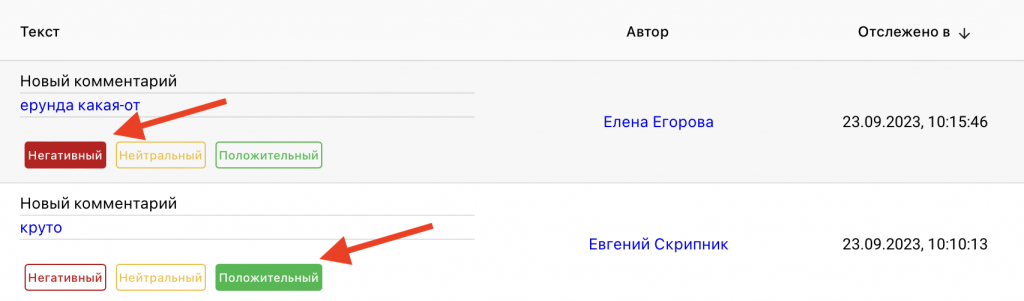
Firstly, the work with comment tags for operators is built in an ultra-convenient and simple way, you can simply click on tag buttons in the comment log to mark comments, and via the link the operator can easily open the comment and read the context if in doubt.
Secondly, there you can set up absolutely any tag or tagging system, and also partially automate the work (after all) — for example, automatically mark comments with profanity using a “bad words” dictionary or other unwanted mentions.
And finally, the service has a special staff of people who, according to your specified criteria, but with “human intelligence” and taking context into account — will tag your comments for you. To do this, you need to request an “individual rate” on the website.
Although modern technologies provide many tools for automatic sentiment analysis, this task remains complex and multifaceted. Due to dependence on context and the limited capabilities of artificial intelligence, the best approach may be a combined method, in which manual analysis complements automatic tools. An experienced specialist will be able to take into account the context and nuances of the language, making the analysis more accurate and useful for your business.