Blog

  • This account can no longer use WhatsApp — reasons and solution

    This account can no longer use WhatsApp — reasons and solution

    Many users encounter an unpleasant situation: «This account can no longer use WhatsApp». Such blocking is often related to sending spam, especially when using so-called «grey» mailings – unofficial solutions for mass messaging.

    How does number blocking for spam happen?

    The main reason is user complaints. If you send a small number of messages that look like something a regular person could send, and no one complains, there will be no problems.

    The main problems start if you are actually spamming. That is, people click «this is spam» or «block» on your messages. If the percentage of such actions is even above 5%, for WhatsApp this is a signal that you should be blocked.

    Other suspicious actions include sending a large number of identical or nearly identical messages.

    Of course, WhatsApp is not run by fools, and they understand that a «grey bot» is connected. And considering that they make money from «white» mailings, they are, of course, financially interested in making you use the white method.

    What to do if you received this message — «This account can no longer use WhatsApp»?

    Ok, not all is lost yet, although it looks very bad.

    You need to use the «appeal» to WhatsApp — usually on this same screen there is a «request review» button or something similar. (if you do not have such a button, it means either you have already done this, or WhatsApp is convinced you are spamming, and their decision is final).

    When you press it, you get the opportunity to send a message to WhatsApp. You should write something like this — of course, adapt it to your situation:

    We are a fitness club, we sent information to our existing clients. We have received consent from all of them to receive information from us, they fill out this form when purchasing a membership. This is not spam, this is informing clients who have agreed to receive information. Please unblock us.

    There is no guarantee this will work — but there is a chance.

    And if your number is restored, please do not use it for mailings again! If you are blocked again for spam, you most likely will not get it back.

    So what should you do? More on this below 👇

    Why are accounts most often blocked?

    WhatsApp actively fights the practice of «grey mailings», automatically blocking accounts suspected of violating the platform’s rules.

    Grey mailings are mass messaging via third-party services that do not have official WhatsApp approval. Using such methods carries several risks:

    • High probability of account blocking – WhatsApp tracks mass mailings and can permanently disconnect your number from the service.
    • User complaints – if recipients mark messages as spam, this speeds up account blocking.
    • Lack of protection and support – WhatsApp does not unblock accounts that were disabled for spam mailings.

    «Grey mailings» — a rare set of problems

    In addition to the high risk of blocking, «grey» mailings come with a number of difficulties:

    • The need to send messages with large intervals – if you send many messages in a short period of time, WhatsApp quickly notices the activity and blocks the number.
    • Text randomization – identical messages are recognized by WhatsApp algorithms as automated mailings, so you have to change the text, which complicates the process.
    • Frequent blocks – even if you are careful, numbers still get sanctioned, so you constantly have to buy new SIM cards and set up everything again.
    • High hidden cost – constant blocks, buying SIM cards, setting up new numbers, and working with proxies can ultimately cost even more than using official «white» mailings.

    How to avoid «This account can no longer use WhatsApp»?

    To avoid blocking and continue effective communication with clients, you need to use «white» (approved) mailings via WhatsApp Business API. This is the official mailing method approved by WhatsApp, which has many advantages:

    • Guaranteed absence of blocks (if you are not actually spamming) – all messages go through verified channels.
    • High client engagement – thanks to message formats with buttons, it is easier for users to respond to requests.
    • Automation support – you can create chatbots and scenarios to improve interaction with your audience.

    It is important to emphasize, if you are spamming — that is, sending information to people who did not ask for it (and did not agree to receive anything from you) — you will most likely be blocked even with the white option. THIS IS NOT A METHOD FOR SPAM. And yes, we condemn spam and do not recommend using it.

    Yes, WhatsApp Business API is a paid tool, but these costs are justified by the reliability and high conversion of interactions with clients.

    A profitable solution: Chotam – only 490 rubles per month

    Many WhatsApp mailing services charge thousands of rubles per month just for connecting a number. And that’s terrible!

    But there is Chotam – a simple and convenient service for «white» mailings and creating bots for only 490 rubles/month. This is an excellent solution for business, allowing you to legally send messages and avoid blocks.

    If you have encountered a block and see the message «This account can no longer use WhatsApp», most likely your number was blocked for sending spam. To avoid such problems, use official «white» mailings via WhatsApp Business API. It is safe, effective, and increases client engagement. And with the Chotam service, you get all the benefits of official mailings without overpaying!

  • A simple bot — almost everything you need

    A simple bot — almost everything you need

    In a world where technology is developing at an incredible speed, a simple bot can outperform the most complex and multifunctional solutions.

    Many bot builders often offer a large number of settings, integrations, and features that seemingly should make business life easier.

    But in practice, things turn out differently: figuring out such builders is akin to learning programming.

    But does your business really need this? Most likely, no.

    Why are complex bots unnecessary?

    Small and medium-sized businesses rarely need bots with dozens of settings, integrations, and other “bells and whistles.” Most often, a few simple functions are enough:

    • Greetings and replies to them (you’d be surprised, but even typing “hello” 10 times a day will tire any customer service operator)
    • Answers to frequently asked questions — payment, delivery, some other keywords specific to your business
    • Sending warming-up sequences with a lead magnet and follow-up content
    • Informing/mailings about promotions and news
    • Requesting feedback from clients.

    Often, bot builders try to offer a solution that can “do everything in the world.”

    As a result, the user faces dozens of incomprehensible settings, complex interfaces, and the need to spend time learning or money to hire special “bot makers” to launch the bot.

    But the goal of a bot builder is to save time, not to spend it on setup.

    A simple bot is the ideal solution for small business

    If you don’t need an AI-powered bot that can hold a philosophical conversation, why overpay and waste time on complex builders?

    You just need a simple and clear tool that allows you to quickly create a bot with basic functions.

    This is exactly the approach offered by the chotam.io service. Here you can create a bot in just a few minutes, using the simplest condition and action blocks and combining them with each other.

    At the same time, chotam.ru supports all major social networks and messengers: VKontakte, Telegram, WhatsApp, Instagram, and others.

    This means your bot can communicate with clients where it’s convenient for them, and you can set it up just once in one place, instead of having a “zoo of solutions” and configuring everything separately — this one for Telegram, this one for WhatsApp, etc.

    Simple bot — advantages

    • Minimal settings You don’t need to be a programmer to create a bot. The interface is intuitive, and the process of creating a bot takes literally a few minutes.
    • Support for all popular platforms
      Your bot will work in Telegram, WhatsApp, VKontakte, Viber, Odnoklassniki, Instagram, Facebook. This allows you to reach the maximum number of clients.
    • Flexibility without complexity You can combine simple scenarios so that the bot performs exactly the tasks your business needs. At the same time, you won’t have to deal with complicated settings.
    • Saving time and money
      A simple bot does not require large expenses for creation and maintenance. You can focus on growing your business, not on learning complex builders. Specifically — 490 rubles per month for 1 bot.
    • Quick start You don’t have to wait weeks for your bot to be ready. With chotam.ru, you can launch your bot today. The builder has several popular templates that you can simply enable, replacing the bot’s reply text with your own where needed. In addition, with the templates you’ll quickly figure out how everything works, without any instructions (but they are available, including video!)

    Who is a simple bot suitable for?

    • Stores — for answering questions about products, processing orders, and informing about promotions.
    • Beauty salons and clinics — for booking appointments, sending visit reminders, and collecting feedback.
    • Any small business — for answering frequently asked questions.

    There’s no need to chase after complex solutions if your business only needs a simple bot. The chotam.io chatbot builder proves that simplicity is not a drawback, but an advantage. Create a bot in a few minutes, set up basic scenarios, and start communicating with clients today. Sometimes the simplest solution turns out to be the most effective.

    Try chotam.ru and see for yourself that a simple bot is exactly what your business needs!

  • Is it possible to send a newsletter on WhatsApp?

    Is it possible to send a newsletter on WhatsApp?

    Is it possible to send a mailing in WhatsApp? The answer is — yes, of course, you can! Moreover, WhatsApp offers a convenient tool for this — WhatsApp Business API. With its help, you can set up mailings with minimal time and effort. In this article, we will figure out how WhatsApp Business API works and why it is the best way to organize mass mailings in this popular messenger.

    Mailings in messengers, and especially in WhatsApp, have long become an important part of marketing for many companies.

    Thanks to high open rates and quick responses, messages in WhatsApp allow companies to keep in touch with clients, promptly inform them about news and offers.

    To the question: is it possible to send a mailing in WhatsApp and how to do it correctly? — we confidently answer that the best solution for this is WhatsApp Business API

    WhatsApp Business API — what is it and why do you need it?

    WhatsApp Business API is a programmatic interface provided by WhatsApp for business. It is designed specifically for automating communications and working with clients on a large scale. If the standard WhatsApp and WhatsApp Business apps are primarily suitable for small businesses and limited message volumes, then WhatsApp Business API solves more serious tasks.

    Main features of WhatsApp Business API:

    • Mass mailings. You can send messages to a large number of clients at once, which is especially convenient for promotions, notifications, and news.
    • Automation. Setting up automatic replies, notifications, and even bots for communicating with clients.
    • Personalization. The ability to customize messages for different audience segments and address specific client groups.
    • Integration with CRM and other business systems. WhatsApp Business API easily connects to your CRM system, allowing you to keep the entire history of interactions with the client.

    Is it possible to send a mailing in WhatsApp: 4 steps for quick setup

    Many companies fear that implementing the API requires special technical knowledge and takes a lot of time. In fact, setting up mailings via WhatsApp Business API is not difficult. Here’s how to do it quickly and easily:

    WhatsApp Business API is closely integrated with the Facebook ecosystem, so the first step is to register in Facebook Business Manager. If you already have a business account on Facebook, part of the work is already done!

    Facebook Business Manager is necessary for verifying your company and further connecting WhatsApp Business API. This is a standard procedure aimed at ensuring the authenticity of the business.

    After registering in Business Manager, you will need to create a business account in WhatsApp Business API. This process includes choosing the company name that will be displayed to users and submitting a verification request. This stage ensures that users see a message from an official account, which increases trust and responses.

    You will need a phone number for mailings. If you already have a number for communicating with clients, it can be connected to the API. It is important to remember that the number must be unique, meaning it cannot be registered in the standard WhatsApp or WhatsApp Business app.

    Usually, this operation is done through the provider’s service dashboard for connecting to WhatsApp — for example — Gupshup. For more details see in our other article.

    During setup, you will need to verify the number. This is a simple procedure: a confirmation code will be sent to the number, which you will need to enter for activation. After that, the number is linked to the business account, and you can start sending messages.

    WhatsApp Business API has high requirements for message content, especially when it comes to mass mailings. All messages you plan to send must be pre-approved as templates.

    Creating templates includes formulating the text, specifying variables (for example, the client’s name or order number), and choosing the language. After submitting the template for moderation, within 15 minutes to a day WhatsApp will give approval, and you can start mailing. This process helps maintain the quality and relevance of messages for clients without violating platform rules.

    Also, you need to set up how your chatbot will work with those who reply/react to the mailing. In our opinion, the simplest, most reliable, and convenient service for this is Chotam

    Advantages of WhatsApp Business API for mailings

    So, setup takes just a few steps, and after completing all stages, you will be able to use WhatsApp for automatic mailings. If you are still wondering — is it possible to send a mailing in WhatsApp via WhatsApp Business API? Here are its main advantages:

    • High conversion. WhatsApp messages are opened much more often than emails or SMS.
    • Personalized communication. The API allows you to send personalized messages that take into account the interests and interaction history with the client.
    • Saving time and effort. Thanks to automation and CRM integration, you can reduce customer support costs and focus on business growth.
    • Fast feedback. Clients can immediately reply to the message, which speeds up the dialogue and allows you to quickly resolve their issues.
    • Convenient analytics. The API allows you to track statistics for each message, understand which messages get responses, and improve your strategy.

    Tips for effective work with WhatsApp Business API

    For maximum effect from mailings, it is important to follow a few simple recommendations:

    • Use segmentation. WhatsApp Business API allows you to send messages to specific client groups. This way, your promotions and news will be interesting to those who are really interested in them.
    • Observe mailing frequency. Too frequent messages can cause a negative reaction from users, so it is important to maintain a balance and not overload clients with information.
    • Monitor content quality. WhatsApp Business API requires messages to be useful, informative, and respectful. Users respond better to messages that are truly interesting to them.

    In conclusion — is it possible to send a mailing in WhatsApp — of course, yes!

    WhatsApp Business API is a simple and powerful tool for automating mailings and working with clients in the messenger. Connecting to the API takes just a few steps, and setting up templates allows you to easily and quickly send messages, attract clients, and ensure feedback.

    With WhatsApp Business API, you will be able to maintain constant communication with clients, increase their loyalty, and boost sales. If your goal is to improve the customer experience, automate processes, and simplify working with WhatsApp, then WhatsApp Business API will become your best assistant.

  • SMM Instagram

    SMM Instagram

    How to do Instagram SMM correctly, when this social network has become an integral part of the marketing strategies of most companies. Instagram maintains significant positions among social networks, despite existing problems.

    Many businesses openly state that they still get the majority of their clients from there, despite numerous stories claiming that supposedly everyone has moved to VK.

    SMM (Social Media Marketing) is marketing on social networks. Using social media to promote a business.

    Instagram SMM Basics

    Creating and Setting Up a Profile

    • Profile photo. Use the company logo or a branded sign that is easily recognizable.
    • Username. It should be short and memorable, matching the company name.
    • Profile description. Clear and informative, including keywords and hashtags. Add a link to your website or landing page. Recently, Instagram has allowed more than one link in the profile — use this to direct clients to specific sections of your site.

    Content Strategy

    • Planning. Develop a content plan for a long period, for example, a month ahead. This helps plan further work without constant rush. Alternate product posts, customer reviews, behind-the-scenes moments, and informational posts.
    • Content quality. Photos and videos should be of high quality. Use a consistent style and filters to maintain visual integrity.
    • Engagement. Ask questions, conduct polls and contests to stimulate subscriber activity.

    Hashtags and Geotags

    • Hashtags. Use relevant hashtags, not exceeding 10 per post. Include branded hashtags and popular ones in your niche.
    • Geotags. Add location to attract a local audience and increase reach.

    Interaction with Subscribers

    • Replying to comments. Be active in responding to comments and messages. This increases audience loyalty and improves brand perception, as timely responses create the image of a professionally managed community.
      • When a community does not respond to reviews or customer questions for days, it looks extremely “untidy” and creates the impression of an abandoned community.

      For better interaction with subscribers, we recommend the Chotam service.

      Advantages of the Chotam service:

      • Comment Tracking. Chotam allows you to track all comments and mentions in real time. This is especially important for quick responses and maintaining audience engagement.
      • Chatbot integration. Automate answers to typical questions using chatbots. This saves time and improves the client experience.
      • Analytics and reports. The service provides detailed reports, which helps evaluate the effectiveness of strategies and adjust them if necessary.
      • Instagram Insights. Use built-in analytics tools to track engagement, reach, and interaction with your content.
      • Audience analysis. Study the demographic data of your subscribers to better understand their interests and preferences.
      • Content effectiveness evaluation. Regularly analyze which posts and stories get the most likes, comments, and saves to optimize your content strategy.
      • Competitor tracking. Compare your metrics with those of competitors to identify new growth opportunities.

      Top Instagram SMM Trends for 2024

      • Video Content. Video continues to gain popularity. Short videos (Reels) allow for deeper engagement with the audience. The social network itself actively shows reels to subscribers and even non-subscribers — in attempts to regain positions lost to TikTok. Therefore, there is a chance to get a large amount of organic reach on reels. Invest in creating quality video content.
      • Authenticity and transparency. Users value sincerity. Share real stories, successes, and even failures. Transparency helps build trust.
      • User-generated content. Encourage subscribers to create content about your product. Repost the best works on your page. This not only saves resources but also strengthens trust in the brand.
      • AR filters and masks. Use augmented reality features to create branded filters and masks. This helps increase engagement and spread the brand.

      Successful business management on Instagram requires a comprehensive approach: from quality content and active audience engagement to using modern trends and tools. The Chotam service will become an indispensable assistant for SMM specialists, especially when working with multiple projects.

      Invest in the right tools and strategies, and your success on Instagram won’t be long in coming!

      How to copy a link to a post on Instagram
      Download Instagram comments
      Chatbot on Instagram
      Paragraph on Instagram — how to do it?

  • Monitoring social media for negativity

    Monitoring social media for negativity

    User opinions can be formed instantly, and sometimes even a single negative opinion can significantly affect a company’s reputation. That is why monitoring networks for negativity has become an integral part of marketing strategy.

    Why is monitoring networks for negativity necessary?

    The main reason companies pay attention to monitoring negative reviews is to protect their reputation. A single negative comment can spread at incredible speed, especially if it concerns serious issues such as product quality or customer service.

    Timely detection of negative mentions allows a company to quickly respond to emerging problems. This can not only prevent further spread of negativity, but also demonstrate the company’s loyalty.

    Negative reviews can serve as a valuable source of information about shortcomings in products or services. By analyzing criticism, a company can identify weak points and take steps to address them, thereby improving its offerings.

    Monitoring is not limited to your own mentions. Studying negative reviews about competitors allows you to learn from their mistakes and improve your own offerings.

    Typical scenarios where monitoring networks for negativity is used


    Now almost every government agency or governor has their own social media account.

    Naturally, their PR or SMM specialists are interested in learning about negative comments in their accounts as quickly as possible, as well as about people’s sentiments on certain topics.

    When a business launches new products/services on the market, or even just advertises its regular offerings, it is of course interested in engaging in dialogue with customers who may be dissatisfied.

    How to monitor social media for negativity?

    Of course, all such tasks can be solved manually) That is, by receiving built-in notifications from social networks — and responding to them.

    But here two problems arise:

    1) A huge number of notifications: in any active account, especially where sensitive topics are discussed — which is exactly where negativity needs to be monitored — there can be more than a hundred comments a day.

    Seeing such a number of notifications and processing them all is hardly realistic.

    Moreover, employees responsible for this also have other tasks, lunches, and so on — which reduces the speed of response.

    But believe us, when some kind of “battle” unfolds in your comments with mentions of undesirable characters or events — you are primarily interested in finding all this, processing it, responding, or finally — deleting it.

    And here Chotam — a service for instant monitoring of comments on social networks comes to the rescue:

    • Forwards them to email or Telegram to responsible persons,
    • Allows you to quickly respond to them or delete them, including automatically — by certain keywords or by time.
    • Exports data for further analysis in Excel.

    Tips

    • Quick response. It is important to respond promptly to negative comments. Apologies, clarifications, and proposed solutions should follow as quickly as possible.
    • Public and private communication. Some problems can be solved publicly, demonstrating to other users that the company cares about its customers. However, complex or personal issues are better discussed in private messages.
    • Analysis and reports. Regularly analyze the collected data and prepare reports. This will help identify recurring problems and make strategic decisions to address them.
    • Employee training. Train your team to respond correctly to negative comments. Developing scenarios and scripts will help standardize responses and make them more professional.
    • Use specialized tools. Our service Chotam was specially developed for these purposes.

    Monitoring networks for negativity is an integral part of modern marketing strategy. It helps protect a company’s reputation, promptly solve emerging problems, improve products and services, and also gain a competitive advantage.

  • How to enable comments in Telegram

    How to enable comments in Telegram

    How to enable comments in Telegram? After all, this is one of the most in-demand features among channel owners, helping to increase engagement, collect feedback, and much more.

    Telegram is a powerful messaging platform that allows you to create channels, groups, and chats to communicate with your audience.

    There is a type of community in Telegram — channels, and comments can only be enabled there. You cannot enable comments on your personal posts.

    How to enable comments in Telegram

    Comments on a Telegram channel work through linked groups, where members can discuss posts. Therefore, after creating a channel, the first thing you need to do is link a group to the channel so that comments become available.

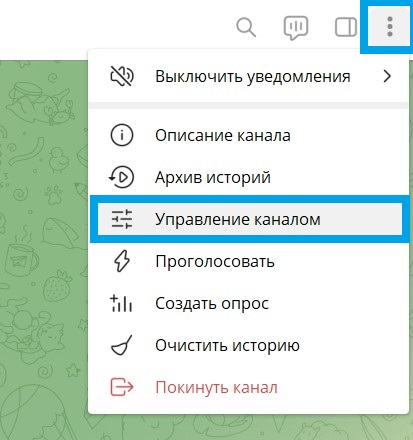
    • Open Telegram and click on the menu button — the “three vertical dots” in the top right corner.
    • Select “Manage Channel”.
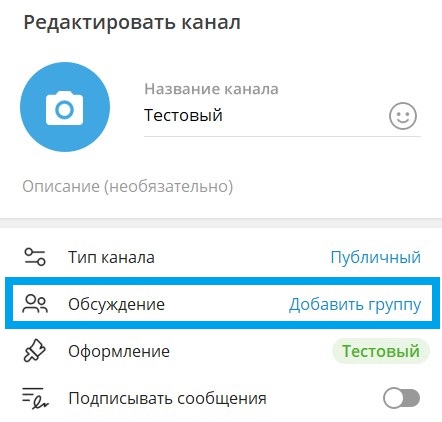
    • Next, “Discussion — Add Group”.
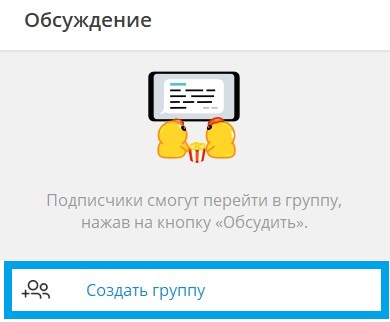
    • Then “Create Group”.
    • Enter the group name and click “Create”.
    • Click “Save”.

    Done! Now the group is linked to the channel, and each post will be forwarded to the group. A “Comment” button will appear under new posts in the channel.

    Notification and moderation settings

    Now you know how to enable comments in Telegram, but for effective comment management, it is important to set up notifications and moderation in your group. You can assign administrators to monitor comments, as well as set up filters for automatic spam removal.

    • In the group settings, select “Manage Group”.
    • Add administrators who will help you with moderation.
    • Set administrator and member permissions according to your needs.
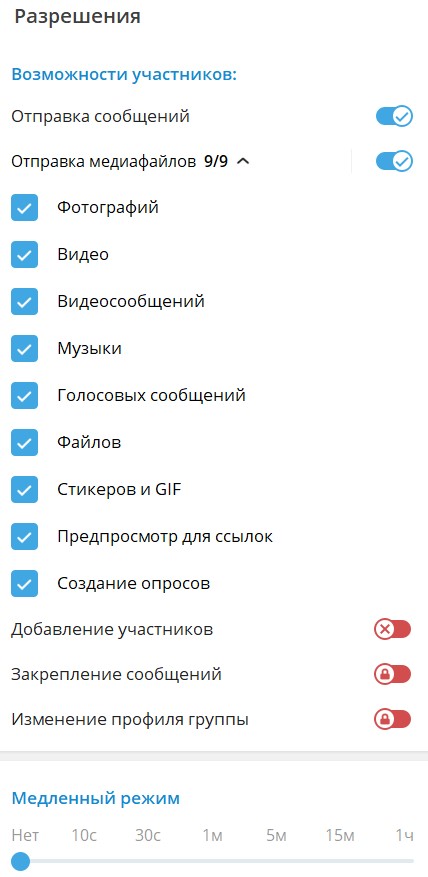
    • Open your group, click on the three vertical dots and select “Manage Group”, in the “Permissions” section you will find many useful features, for example:

    Member capabilities. In this section, you can prohibit sending various media files, such as stickers or voice messages.

    Slow mode. Time restrictions for sending messages — this way, you protect your channel from spam.

    Blacklist. You will be able to add users who violate the rules of communication in your channel in the future.

    Chotam: Comment Tracking Assistant

    Managing comments can be challenging, especially if you have a large channel with an active audience. This is where our service chotam.ru. comes to the rescue. It allows you to automatically forward comments from Telegram to convenient communication channels for you, such as email or messengers.

    • Instant notifications. Receive notifications about new comments as soon as they appear and respond in a timely manner.
    • Centralized management. All comments will be collected in one place, making it easier to process and respond to them.
    • Convenient moderation. Chotam allows you to quickly track and moderate comments, which is especially useful for large channels.
    • Export to Excel — you can always export the collected comments to conduct any analysis yourself — find the most active subscribers, the most commented post, and so on.

    Enabling comments in Telegram is a great way to increase your audience’s engagement and create a more active community around your channel. If you decide that comments are no longer needed, you can always easily disable them.

    Read more useful articles in our blog

    Advantages of using Chotam

  • How to copy a link to a post on Instagram

    How to copy a link to a post on Instagram

    Instagram is a powerful platform for marketing and communication. Sometimes you need to share a specific post with colleagues, clients, or friends. In this article, we will explain how to easily and quickly copy a link to a post on Instagram.

    You may also need a link to a post in order to quickly access a specific post for analytics, comment management, or using third-party services.

    Via the mobile app

    • Open the Instagram app Launch the app on your smartphone and log in to your account.
    • Find the desired post. This can be your post or a post from any other user.
    • Tap the “paper plane”. In the lower left corner of the post, there is a “paper plane” icon. Tap it to open the options menu.
    • Select “Copy Link”. In the menu that appears, select the “Copy Link” option. After tapping the icon, the label will change to “Copied”. The link to the post will be copied to your device’s clipboard.
    • You can also copy the link via the “Share” option. After tapping it, you can copy the link, send it directly to the desired app, open it in a browser, etc.

    How to copy a link to an Instagram post via the web version

    • Go to the Instagram website. Open your browser and go to instagram.com. Log in to your account.
    • Find the desired post. Go to the post you want to share.
    • Click on the three dots. As in the mobile app, the three dots are in the upper right corner of the post. Click on them.
    • Select “Copy Link”. In the dropdown menu, select the “Copy Link” option. The link will be copied to your device’s clipboard.

    Tips for marketers

    For SMM specialists, it is important not only to publish posts, but also to understand how to work with them effectively:

    • Analyze engagement. Use links to bookmark, analyze audience engagement, and track campaign effectiveness.
    • Share with your target audience. Distribute post links via email, messengers, and other social networks for maximum reach.
    • Use third-party services, for example — for exporting comments from Instagram for further analysis

    Copying a link to a post on Instagram is a simple but important task that helps promote content and interact with your audience. Follow our steps to easily handle this task and use the links you get to improve your marketing strategies.

  • Download Instagram comments

    Download Instagram comments

    Instagram is the most popular business platform among social networks in the world. Instagram provides unique opportunities for interacting with your audience, attracting new clients, and strengthening your brand. One of the key elements in this process is user comments. In this article, we will look at how you can download Instagram comments and why this is important for your business.

    Comments reflect opinions, emotions, and feedback that can make your Instagram profile more attractive to potential clients. However, it is not always convenient to analyze comments directly in the Instagram app. For more effective comment management and to use them in marketing strategies, businesses often need the ability to download them for further analysis.

    Why is comment analysis so important for your business?

    • Running a giveaway in the comments. A common practice that increases your business profile statistics and user engagement.
    • Analysis of feedback and opinions. Comments can contain valuable information about your products or services. Downloading comments allows for a more detailed analysis of feedback, which helps improve products or services.
    • Increasing engagement. Replies to comments from your brand can improve audience engagement. Downloading comments allows you to track all user requests and respond to them promptly.
    • Content creation. Comments can be a source of inspiration for creating new content. Understanding the requests and interests of your audience helps create content that will be more attractive to your target audience.
    • Competitor monitoring. Comments on your competitors’ posts can also contain valuable information. Downloading comments allows you to analyze competitors’ activities and take steps to improve your own strategy.

    How to download Instagram comments

    • Manual method. The most labor-intensive method, but also the most reliable. You can copy comments manually or use screenshots to save information. Suitable for beginner accounts with a small number of comments.
    • Instagram API. For more technically savvy users, there is an option to use the Instagram API to obtain comments. This method requires programming skills and access to the API.
    • Using third-party services and apps. There are apps and online services that allow you to download comments from Instagram posts. These apps usually provide the option to upload a link to a post, after which you can access the comments in a convenient format.

    One of the reliable and accessible options is our Chotam service for working with comments on social networks

    • To get started, register at Chotam — we have a free trial period and a bunch of other useful features
    • Create a “Task” with a link to the Instagram post you are interested in
    • The download of comments will start automatically.
    • You need to wait a few minutes. If the comment counter stops increasing after a while, it means all comments have been downloaded.
    • If necessary, use filters (you can filter by date, author name, mentions, specific words, and more)
    • Download the selected comments to an Excel table — the button will be in the upper right corner.

    Downloading Instagram comments is an important tool for businesses, helping to analyze audience feedback, improve engagement, and create a more effective marketing strategy. Regardless of the chosen method, regular comment analysis will allow you to stay up to date with your clients’ opinions and successfully develop your brand on social media.

  • Got blocked on WhatsApp — what to do?

    Got blocked on WhatsApp — what to do?

    When your number gets blocked on WhatsApp — the usual question is, of course, how to remove it. We will talk about this in our article below.

    But first, we offer a slightly different perspective on this question — how to PROTECT YOURSELF from being blocked on WhatsApp, or at the very least — how to MITIGATE THE CONSEQUENCES.

    Blocking a number on WhatsApp — what can cause it?

    Let’s first figure out why your number on WhatsApp can be blocked.

    There are only 2 main reasons for blocking:

    • You are doing something that your message recipients complain about — usually — sending spam (or some other unwanted information).
    • You have connected your number to a «grey bot» for sending out information.

    The most important thing is to understand about user complaints. No one at WhatsApp will investigate whether it was really spam (sending advertising without the recipient’s permission), or if your recipient actually checked a box on some paper form at your clinic — «I agree to receive information from the clinic».

    If a person receives a message and clicks «report» — and if about 5% of your recipients do this, you can be blocked.

    There are quite a few cases where people managed to get blocked without doing any mailings at all, just by chatting with someone. The «triggers» that can lead to this are not fully understood.

    The second scenario is when WhatsApp’s internal systems «see» that some person is sending an excessively large number of messages, and they are very much the same.

    If you use a «grey bot» to do your mailings — you need to make sure that you have a sufficiently large interval between messages (a few minutes — should be enough for a regular person to type this text manually).

    It is also necessary to insert so-called «randomization», that is, special blocks where words or phrases are replaced in each subsequent message with synonyms or similar expressions.

    Attention: WE DO NOT use «grey bots», WE DO NOT endorse the practice of grey mailings (it obviously violates WhatsApp’s rules) — and we urge you NOT to use them.

    How to protect yourself from blocking or prevent negative consequences

    The path to try to overcome blocking will be described below, but for now — let’s talk about reducing the consequences.

    Imagine, you have a webinar today, you need to send reminders, and then your number gets BLOCKED. What to do? The webinar is ruined, or at the very least — the attendance will take a serious hit!

    Therefore, the most reasonable way to reduce this risk is DUPLICATION.

    If you are a regular user — get yourself one or two or as many extra SIM cards as you can, from which you can send information.

    If you are a WhatsApp Business API user — create another «business« in Facebook, and add 2-3 numbers to both businesses. Connecting them in Chotam costs NOTHING on the free plan, but in case of problems you will have a «plan B».

    And as a maximum measure — create another FB account (under a different name), create a business in it, and connect numbers there. This may seem excessive, BUT there have been cases where, due to spam, ALL WhatsApp numbers connected to FB were blocked at once — not just the one that sent spam.

    But here everything depends on the ratio of your effort/energy spent on this (it costs almost no money) and how much you would lose if your WhatsApp number is blocked.

    All this will help protect you from being left WITHOUT a communication channel with your information recipients at a critical moment.

    Blocking a number on WhatsApp — stages

    When a number is blocked, there are 4 stages (for a regular user — only 2, and 2 — the first and last only for those who use WhatsApp Business API).

    • Template blocking — this template cannot be sent temporarily. Only for WhatsApp Business API — NOT for regular users.
    • Number blocking with the possibility of «appeal» — that is, you cannot send anything, you can only click the «request review» button — there you can write something about not sending spam, these are our clients, etc. (more on this below).
    • Permanent number blocking — occurs after your «appeal» is reviewed, if the moderators do not agree with your arguments. You can no longer use WhatsApp with this number, and there is nowhere else to appeal.
    • Blocking the entire business account in Facebook — all connected numbers are blocked and you cannot connect new ones. Only for WhatsApp Business API.

    How to «appeal» or «request review»

    If your number is blocked, but not permanently — there is a «request review» button (the name of the button may change as WhatsApp’s interface and localization change, but the essence is the same).

    For regular WhatsApp users, this button will be in the app on your phone.

    For WhatsApp Business API users — in the business dashboard in Facebook — in WhatsApp Manager.

    When you click it, you are prompted to enter some text.

    You need to write something there that describes your situation and says that this is not spam.

    Example: «please take a look, we are a clinic, we send information to those who have visited us. This is not spam — all these people signed a consent form for information, and there were very few of them. This is not a mass mailing, and not spam.»

    You can try writing the same thing in English. There is an unverified rumor that this improves your chances of being unblocked.

    In general, with a fairly high probability, after the first preliminary block you will be unblocked. Apparently, something like «give a second chance» works.

    Usually after the second or third block — it will not be possible to recover.

  • How to connect WABA – Whatsapp Business API

    How to connect WABA – Whatsapp Business API

    WhatsApp Business API (WABA) is a tool for businesses that allows interaction with customers via WhatsApp. Connecting WABA will enable a company to send newsletters, order notifications, offers, and much more directly to users’ messengers.

    Connecting WABA is an important step for a business that will help improve communication with customers and increase the effectiveness of marketing campaigns.

    Types of WhatsApp Mailings

    There are basically two types of mailings in WhatsApp:

    • Unofficial mailings. This includes all possible ways to bypass WABA: creating groups, regular “manual” messages, all sorts of “gray” mailers. The only advantage of unofficial mailings is the cost.
    • Official mailings via WhatsApp Business API

    WhatsApp has strict rules regarding message mailings. Unofficial mailings are blocked by the service quite quickly, as WhatsApp strives to maintain a high level of security and user data protection. Therefore, we strongly recommend connecting the WhatsApp Business API (WABA) to avoid blocks and maintain your brand’s reputation.

    Read more about the different types of mailings in our article — How to send mailings in WhatsApp: all methods

    Connecting WABA — pros and cons

    Pros

    • Professionalism and reliability: WABA gives companies official status in WhatsApp, which increases customer trust.
    • Scalability: The ability to handle large volumes of messages, making WABA an excellent tool for large companies.
    • Personalization and interactivity: WABA allows you to create personalized messages and provide customers with interactive features — in particular, buttons to react to messages, with which you can implement many possibilities.

    Cons

    • Limited Access: Access to WABA is not as simple as creating a regular WhatsApp account. It is provided only to businesses that have gone through the approval process from WhatsApp.
    • Complexity in Setup: Connecting WABA can be a complex process, requiring technical skills and certain knowledge.
    • Cost: Payment for connection services and use of the tool. More details in our article — Whatsapp Business API — price

    How to connect WABA

    • Get access to WhatsApp Business API. You will need a Facebook Business account to which you will connect the phone number. You need to submit a request to connect to the WhatsApp Business API, which is usually done from the WABA provider’s dashboard — such as Gupshup, for example. This step includes the verification and approval process from WhatsApp.
    • Profile setup. After access is granted, you will need to set up your profile — add company information and other data.
    • Select a mailing builder. After connecting WABA, you need to connect a mailing builder, which will simplify the creation and management of mailings. In principle — this is the most important stage. Everything above can be implemented with any builder, but it is this point that will determine what the mailer can or cannot do, how convenient it is to work with, and what statistics are available. We recommend the mailing platform Chotam — an intuitive service with fast support ready to help with WABA connection.
    • Business verification. To send more than 250 messages per day, you will need to verify your business on Facebook.
    • Creating templates and testing. Use message personalization features to attract customer attention. Quick automated replies in the form of buttons. Test before sending to make sure everything works correctly.
    • Monitoring and analytics. After launching mailings, it is important to track and analyze their effectiveness. Monitoring will allow you to make adjustments to your strategy and improve results.

    So, connecting to the WhatsApp Business API can be an excellent tool for improving communication with customers and increasing the effectiveness of marketing efforts. However, it is necessary to pay attention to the rules and policies for using mailings, ensure the protection of customer data, and follow recommendations for using this tool to achieve the desired results in business.