
Instagram is the most sales-oriented social network. And tracking comments on Instagram is extremely important for sales. In fact, Instagram is one big feed of posts with photos that people like, comment on, and repost. The social network notifies account owners about all these actions. But you need to see your “warm” audience, those people who are interested specifically in your product. Therefore, out of all the notification information, you will be most interested in the comments.
Indeed, a person asking “Price?”, “How much does it cost?”, “Is there delivery?”, “Do you have it with mother-of-pearl buttons?” — this is a hot client. They are almost ready to buy from you. If you don’t respond right away, you’ll lose them. And they will surely find another option. So what should you do?
Is it possible to track comments on Instagram using built-in tools?
The problem is that you can receive comments in only three ways. And none of them are very convenient:
- Via push notifications: they crowd each other out on the screen. Easy to miss.
- In the general “inbox” folder, on the linked Facebook page. This requires either a constantly open browser on your computer or an app on your phone. And again, it’s easy to miss among a bunch of other notifications.
- Manually, by clicking the “heart” in your profile — and viewing the history. It will look like this:
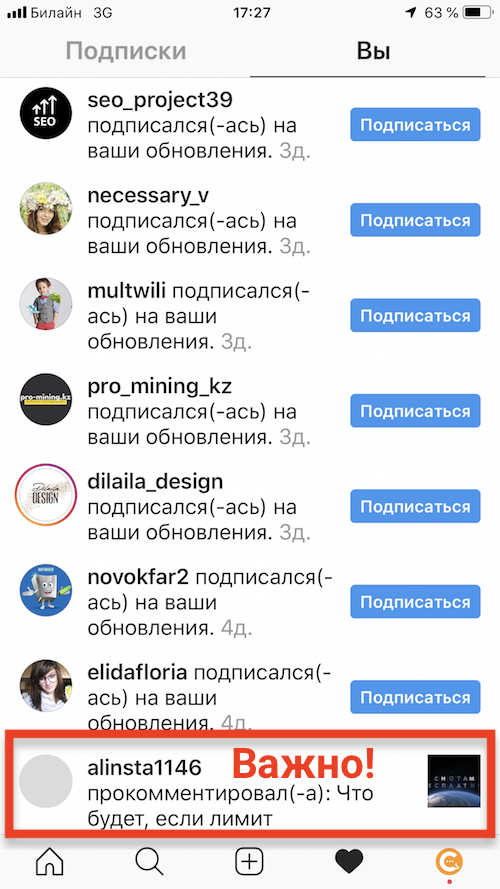
The root of the problem with tracking comments on Instagram is the following. Insta tries to notify you about everything under the sun. Someone liked your post, someone followed you. In active communities, this can happen constantly in a continuous stream. But you are primarily interested in comments, because this is a “signal” of a potential client. Look at the picture above. Here, you are only interested in the comment at the very bottom, not the whole list of followers.
For those who need to track comments on Instagram, a special service Chotam comes to the rescue. With its help, you will receive notifications about comments at any time of day. By email, in Telegram, in Viber, or in private messages on VKontakte. You can reply to comments on your business account or delete them without logging into Instagram. This is very convenient if you manage several accounts.
You can also set up forwarding of comments to your colleagues. As a result, whoever is free at the moment can respond to them.
And you can also export comments to Excel — and do any analytics you want with them there.
The Chotam service does not need your login and password. Chotam uses the official, Facebook-approved method for app access to receive comments.
There is a free plan! Enjoy!
Or maybe you have a similar problem, but for VKontakte? Read our other article.
Leave a Reply